
This release brings powerful new enhancements designed to give users greater control, clarity, and efficiency in every interaction with Hapax. With Agentic Chat, you can now customize your AI experience by selecting specialized agents tailored to your task. The new Agent Workspace provides full visibility into how Hapax works—showing its plans, files, and processes in real time. And with Saved Prompts, you can store, organize, and instantly reuse your most important prompts for faster, more consistent workflows.
Together, these features make Hapax more intelligent, more explainable, and more aligned with the way you work.
Agentic Chat
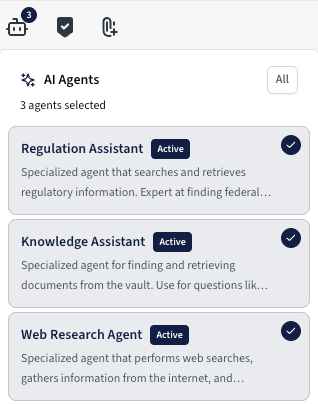
Quickly activate or deactivate agents using the streamlined menu attached to the prompt box.
We’re excited to introduce Agentic Chat, a powerful new way to interact with Hapax by enabling specialized AI agents that work together to deliver more accurate, contextual, and task-optimized responses. Users can now tailor each chat session by choosing exactly which agents they want active—ensuring Hapax adapts to the type of work they’re doing in real time.
To access Agentic Chat, simply select the icon in the bottom-left corner of the prompt box to open the AI Agents menu. From there, you can manage which agents are activated for your current chat.
Available Agents
1. Regulation Assistant (Active by Default)
A specialized agent that searches and retrieves regulatory information. Expert at locating federal regulations, interpreting compliance requirements, and explaining regulatory guidance.
2. Knowledge Assistant (Active by Default)
Designed to search and retrieve documents from your Information Vault. Ideal for questions like “What is our [policy]?”, “Find documents about [topic],” or locating any policy, procedure, or form stored in your vault.
3. Web Research Agent (Active by Default)
Performs online searches and synthesizes external information. Useful for supplementing vault and regulatory knowledge with up-to-date public sources.
Key Features
- On/Off Agent Controls: Toggle agents on or off based on your needs. Changes take effect immediately within the same chat session.
- Multi-Agent Collaboration: Hapax uses all active agents together behind the scenes—each agent contributes its expertise, and the system synthesizes a unified, optimized response.
- Real-Time Visibility: As agents work, you’ll see indicators showing which agents contributed, allowing transparency into how each answer was formed.
- Adaptive to Your Workflow: Whether you’re performing compliance reviews, searching your vault, researching externally, or executing processes, Agentic Chat ensures the right intelligence is applied every time.
Benefits
- Better Answers: Each agent brings specialized expertise, improving precision and relevance across a wide range of tasks.
- Faster Workflows: No need to switch tools or rethink your prompt—activate the right agents and get optimized results instantly.
- Customizable Experience: Tailor your chat to your role, preferred workflow, or specific task.
- Greater Transparency: See exactly which agents contributed, helping build trust and clarity in the AI’s reasoning.
- Scalable for Teams: From complex compliance questions to everyday operational queries, Agentic Chat supports every department’s needs.
Agent Workspace
We’re introducing the Agent Workspace, a redesigned panel that brings greater transparency, clarity, and control to every interaction you have with Hapax’s agentic system. Agent Workspace gives you a real-time view into how Hapax is thinking, which files it’s using, and which processes or tools it activates to complete your request—all in one organized, easy-to-navigate space. The Workspace is divided into three key sections: Current Plan, Context Files, and Available Processes.
Key Features
- Current Plan: For complex or multi-step tasks, Hapax may generate a structured plan before producing a final response. The Current Plan section displays that plan so you can see the steps Hapax intends to take, understand the logic behind the workflow, and follow along as the agent executes each stage.
- Context Files: This section shows exactly which files Hapax used to answer your prompt—such as JSON, Python scripts, markdown files, or other structured data sources. Each file is clickable, allowing you to open, inspect, or download the referenced content. This gives complete transparency into the information powering your response.
- Available Processes: Here, you can see which agentic processes, tools, or workflows Hapax used (or could use) to complete your request. Each process includes a short description explaining what it does—whether it retrieves documents, runs a compliance check, executes a workflow, performs data extraction, or more. This helps users understand the system’s capabilities and how each tool contributes to the outcome.
Benefits
- Full Transparency: Understand how Hapax arrived at an answer by seeing its plan, supporting files, and activated processes.
- Greater Trust: Clear visibility into data sources and reasoning builds confidence in each response.
- Efficient Troubleshooting: If something looks off, users can quickly inspect which file or process influenced the output.
- Enhanced Learning: Users gain insight into which tools Hapax uses for particular tasks, helping them become more effective prompt writers.
- Actionable Insights: The ability to view and download referenced files supports audits, reviews, and follow-up analysis.
Saved Prompts

Manage all your saved prompts in one place — create, search, favorite, edit, adjust permissions, and delete with ease.
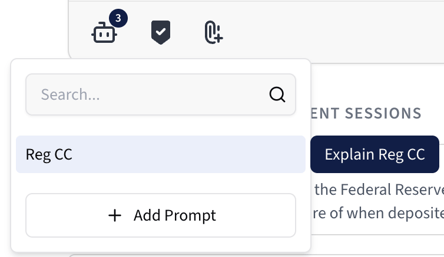

Use the Saved Prompts quick-access menu to instantly insert an existing prompt or create a new one right from the prompt box. View the prompt text on hover.
We’re excited to introduce Saved Prompts, a new feature designed to help users quickly access and share their most frequently used prompts when working with Hapax. Whether you're drafting policies, asking compliance questions, or running recurring operational workflows, Saved Prompts makes it easy to store, organize, and reuse the prompts that matter most to you.
Key Features
- Save Frequently Used Prompts: Store prompts you use often so you can apply them again in future conversations without retyping.
- Quick Access: Instantly browse or search all your saved prompts directly from the settings section.
- Full Prompt Management: Create new saved prompts, edit existing ones, update permissions, or delete prompts you no longer need.
- Favorites for Fast Recall: Mark important prompts as favorites and surface them at the top of your list for even faster access.
- Permission Controls: Assign who can view or use a saved prompt—ideal for team-wide standardization or department-specific workflows.
Benefits
- Efficiency: Reduce repetitive typing and streamline your recurring tasks or analyses.
- Consistency Across Teams: Ensure your institution uses standardized prompts when interacting with Hapax, improving quality and reliability of outputs.
- Personalized Workflow: Organize prompts in a way that fits your role—favorite the ones you use daily, archive or delete those you no longer need.
- Collaboration-Ready: Share prompts across teams through permission settings, enabling consistent communication, analysis, and document creation practices.
Performance Improvements
We’ve upgraded Hapax’s underlying architecture, delivering significant improvements in speed, accuracy, and overall system intelligence. This upgrade enhances nearly every interaction across Hapax—from document analysis to real-time chat responses.
Key Features
- Faster Response Times: The new model processes queries more efficiently, resulting in noticeably quicker responses in both chat and document-related workflows.
- Enhanced Multi-Step Problem Solving: With improved planning and reasoning capabilities, Hapax handles multi-step or multi-agent tasks more effectively—especially within the new Agentic Chat and Agent Workspace features.
- Better Responses: The new model provides stronger reasoning, improved comprehension of complex financial and regulatory content, and more precise outputs across compliance, operational, and policy-focused tasks.
- Improved Document Understanding: Richer embeddings and more capable language processing enable deeper, more accurate analysis of policies, procedures, and regulatory texts.
Benefits
- Faster Responses: Get answers and results more quickly, even for complex or multi-part prompts.
- Improved Scalability: Enables teams with complex or high-volume AI usage.
- Higher Throughput: Supports larger workloads with greater efficiency.
- Foundation for Future Features: Sets the stage for more advanced functionality without slowing down performance.
We’re here to help.
For questions or a guided walkthrough of these new features, please don’t hesitate to reach out to our support team. We're always listening to your feedback and evolving the platform to support the way you work best. As your needs grow, Hapax will continue to grow with you. Thank you for being a valued Hapax user. These updates are part of our continued mission to make Hapax smarter, faster, and more adaptable to the way you work—because we believe that innovation should work for you.
Warm regards,
The Hapax Team